HASNIT3CH HELLO No Change SN Checkm8 Bypass – iPhone Hello Screen Bypass Without Serial Number Change
HASNIT3CH HELLO No Change SN Checkm8 Bypass is a professional Windows tool that bypasses the iPhone Hello screen and iCloud Activation Lock using the hardware-level Checkm8 bootrom exploit — while keeping the device’s original Serial Number completely unchanged. Developed by Hassan Mahmood Chohan (HASNIT3CH) for professional iPhone repair technicians and unlocking shops.
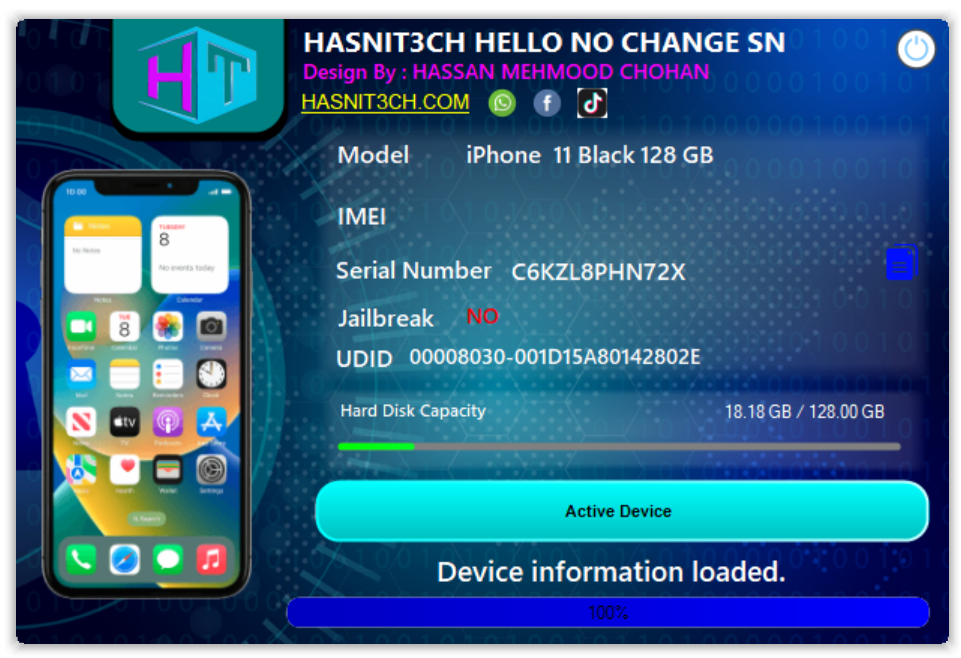
What is HASNIT3CH HELLO No Change SN Checkm8 Bypass?
HASNIT3CH HELLO No Change SN Checkm8 Bypass is a Windows desktop tool that removes the iPhone Hello screen (also called the iCloud Activation Lock or setup screen) on Checkm8-supported devices from iPhone 5s to iPhone X. Unlike most iCloud bypass tools that alter, randomize, or wipe the device Serial Number, this tool completes the entire process with No Change SN — the original factory Serial Number stays fully intact.
This makes it the ideal iPhone Hello screen bypass tool for legitimate repair cases where the device identity, IMEI, and warranty status must be preserved.
What is the iPhone Hello Screen and iCloud Activation Lock?
The Hello screen is the first screen an iPhone shows after a factory reset, restore, or erase. When an iCloud account is still linked to the device, it gets stuck on this screen and cannot be set up without the original Apple ID and password. This security feature is known as iCloud Activation Lock or Find My iPhone (FMI) lock.
HASNIT3CH HELLO Checkm8 Bypass resolves this at the bootrom level, allowing the device to pass the Hello screen and become usable again — without changing the Serial Number.
Key Features of HASNIT3CH HELLO Checkm8 Bypass
Hello Screen & iCloud Bypass via Checkm8
Uses the powerful Checkm8 bootrom exploit to bypass the iPhone Hello screen and iCloud Activation Lock. Because Checkm8 is a hardware-level exploit, Apple cannot patch it through iOS software updates — making the bypass permanent and reliable across iOS versions.
No Serial Number Change (No Change SN)
The defining feature of this tool. Unlike other iCloud bypass methods that alter or randomize the iPhone Serial Number, HASNIT3CH HELLO Bypass completes the process without touching the SN. The original factory Serial Number remains 100% intact.
Preserves Device Identity & IMEI
Because the Serial Number is unchanged, the device retains its original identity — IMEI, model information, and warranty status all stay as-is. Essential for repair shops that return unlocked devices to customers.
Windows-Based Tool, No Dongle Required
Runs entirely on Windows (7, 8, 10, 11) via USB. No hardware dongle, no Mac, and no Linux setup required — a clean, pure software solution.
Real-Time Device Detection
Automatically detects the connected iPhone model, iOS version, ECID, and Serial Number before any operation begins — full device info displayed live.
Fast, Stable & Repeatable
Checkm8-based bypass is stable and tested extensively in professional repair shop environments for consistent, repeatable results.
Supported iPhone Models (Checkm8 A5–A11)
HASNIT3CH HELLO No Change SN Checkm8 Bypass supports all Checkm8-compatible iPhones from iPhone 5s to iPhone X:
- iPhone 5s (A7)
- iPhone 6 / 6 Plus (A8)
- iPhone 6s / 6s Plus / SE 1st generation (A9)
- iPhone 7 / 7 Plus (A10 Fusion)
- iPhone 8 / 8 Plus / iPhone X (A11 Bionic)
Note: Checkm8 supports A5–A11 chipsets only. For iPhone XS and newer (A12+) devices, use HASNIT3CH ACTIVATOR A12+ or HASNIT3CH A12 RAMDISK EXPLOIT.
How to Bypass iPhone Hello Screen – Step by Step
- Connect your iCloud-locked iPhone to a Windows PC using a USB cable.
- Open HASNIT3CH HELLO No Change SN Checkm8 Bypass — the device is auto-detected.
- Confirm the device model, ECID, and Serial Number shown on screen.
- The tool puts the device into DFU mode using the Checkm8 exploit.
- Click Bypass Hello to start the process.
- Wait for completion — the Hello screen and iCloud Activation Lock are bypassed.
- Done — the iPhone is usable with the original Serial Number fully preserved.
Technical Specifications
- Platform: Windows 7, 8, 10, 11 (x64)
- Developer: Hassan Mahmood Chohan (HASNIT3CH)
- Exploit: Checkm8 (bootrom-level hardware exploit)
- Chipset Support: A7 to A11 (iPhone 5s to iPhone X / 8 Plus)
- Serial Number Change: No — original SN fully preserved
- Connection: USB | Dongle: Not required
- Interface: C# WinForms, professional dark UI with real-time log
HASNIT3CH HELLO vs Other iCloud Bypass Tools
- No SN Change: Most bypass tools alter the Serial Number — HASNIT3CH HELLO keeps it original.
- Checkm8 Bootrom Level: Hardware exploit, not affected by iOS updates.
- Windows Native: No Mac, no Linux, no complex setup required.
- Professional Grade: Built for daily repair shop use, not hobbyist experiments.
Frequently Asked Questions
What is HASNIT3CH HELLO No Change SN Checkm8 Bypass?
It is a professional Windows tool that bypasses the iPhone Hello screen and iCloud Activation Lock using the Checkm8 bootrom exploit, while preserving the original device Serial Number.
What does “No Change SN” mean?
It means the tool bypasses the Hello screen without modifying, replacing, or randomizing the iPhone Serial Number. The original factory SN remains completely intact after the process.
What is Checkm8?
Checkm8 is a bootrom-level hardware vulnerability affecting Apple A5 to A11 chips. Because it exists in the hardware bootrom, Apple cannot patch it through iOS updates, making it a permanent and reliable exploit for supported iPhones.
Which iPhones does it support?
iPhone 5s, 6, 6 Plus, 6s, 6s Plus, SE 1st gen, 7, 7 Plus, 8, 8 Plus, and iPhone X (A7 through A11 chipsets).
Does it work on iPhone XS and newer (A12+)?
No. Checkm8 supports A5–A11 chips only. For A12 and newer devices, use HASNIT3CH ACTIVATOR A12+ or HASNIT3CH A12 RAMDISK EXPLOIT.
Does it require the original Apple ID or password?
No. The tool bypasses the iCloud Hello screen without needing the original Apple ID or password.
Is a hardware dongle required?
No. HASNIT3CH HELLO is a pure software tool — no dongle or hardware key needed.
Is it safe to use on customer devices?
Yes. The tool is tested in a professional repair shop environment, and the No Change SN feature keeps the device identity fully protected.
Where can I buy HASNIT3CH HELLO Checkm8 Bypass?
Contact: [email protected] | WhatsApp +923038736868 | hasnit3ch.com
Conclusion
For iPhone repair technicians who need a reliable, SN-preserving iPhone Hello screen bypass and iCloud Activation Lock removal on Checkm8 devices (iPhone 5s to iPhone X), HASNIT3CH HELLO No Change SN Checkm8 Bypass is the professional choice — bootrom-level, no dongle, no SN change, Windows-native. Your customer’s device identity stays fully protected. HASNIT3CH — professional tools for professional repair shops.